W-9 Form

PDF Form IRS

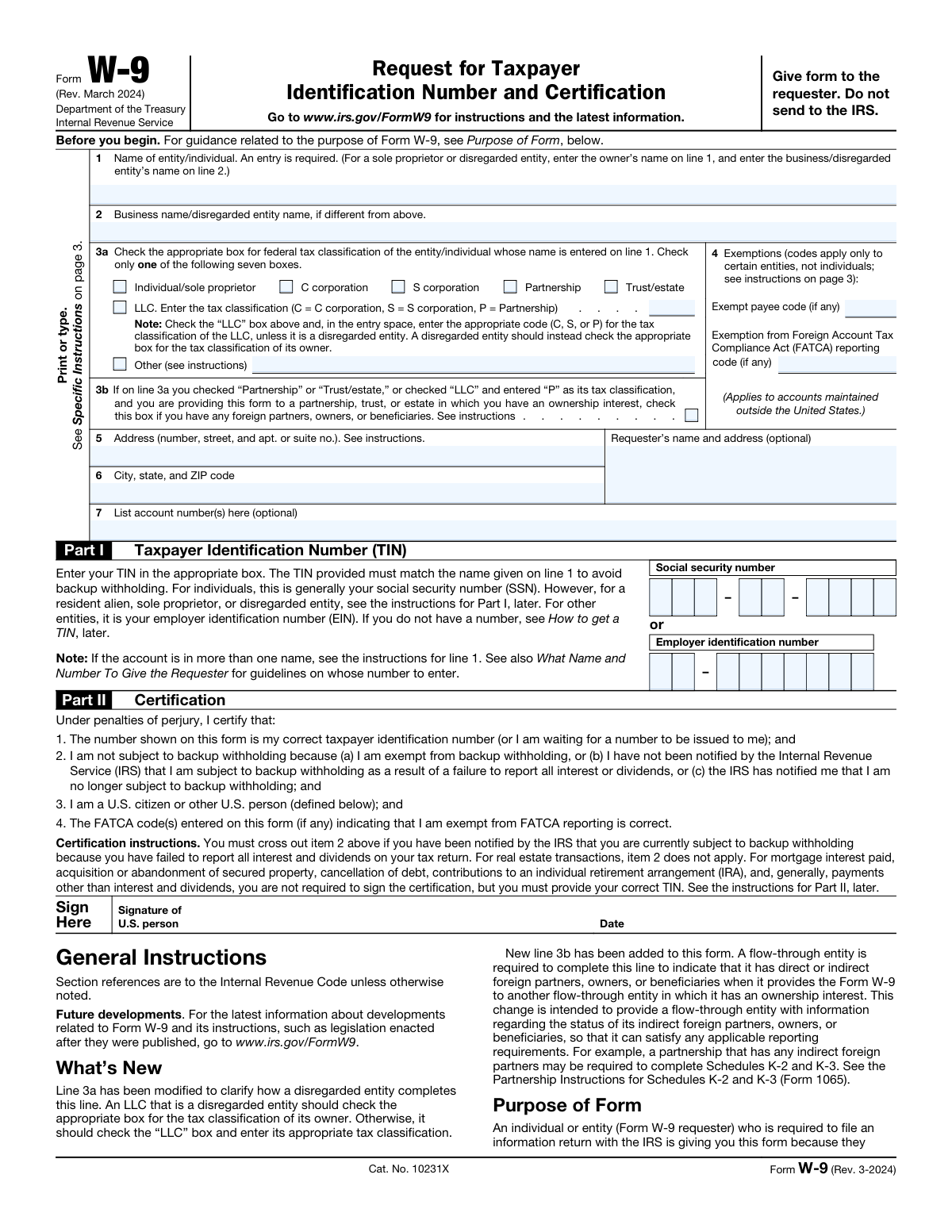
Use IRS Form W-9 to provide your correct Taxpayer Identification Number (TIN) to businesses that need to report payments to the IRS. Required for independent contractors, freelancers, and vendors.

W-9 Form Preview
2026
Testimonials

Trusted by contractors and businesses

“DocuQueue made vendor onboarding painless. We send the W-9 link, they fill it online, and we get the completed PDF instantly. No more chasing paperwork.”
— Sarah Mitchell, Finance Director at Horizon Consulting
“We process 200+ W-9 forms a quarter through the API. The batch upload from CSV saved our accounting team dozens of hours each month.”
— James Park, Operations Manager at Peak Freelance Agency
Requirements

What you need to fill a W-9

These fields come from the official IRS Form W-9 (Rev. March 2024). Check off each item as you gather the information.

Line 1: Your full legal name As shown on your income tax return (individual or entity name)
Line 2: Business name (if different from Line 1) Leave blank if your business name is the same as your legal name
Line 3: Federal tax classification Check only one box. LLCs also enter a code letter (C, S, P, or blank)
Lines 5 and 6: Address (number, street, apt/suite, city, state, ZIP) Use the address where you want to receive mail
Social Security Number (SSN) or Employer Identification Number (EIN) SSN: 9 digits. EIN: 9 digits in XX-XXXXXXX format
Certification statement (sign under penalty of perjury) You certify the TIN is correct and you are not subject to backup withholding
Signature and date Form is invalid without a signature and date. You can sign electronically.
0 of 7 items ready
How It Works

Fill W-9 in 4 steps

Our AI completes the form accurately in under a minute. No manual data entry required.

STEP 01

Upload your data

Enter contractor or vendor information manually, or upload from a spreadsheet, vendor database, or previous form.

STEP 02

AI fills the form

Our AI maps each value to the correct field, including tax classification and TIN. Done in seconds.

STEP 03

Review and download

Check the filled form in our visual editor. Make corrections if needed, then download the PDF.

STEP 04

Send to requester

Send the completed form to the payer or business that requested it for their records.

Why DocuQueue

Why teams choose DocuQueue for W-9 forms

Speed

Complete your W-9 in under 60 seconds. No manual data entry, no formatting headaches.

Accuracy

AI performs compliance checks to ensure your form is error-free before you download it.

Security

Your data is encrypted at rest and in transit. We never store your information after processing.

Batch Processing

Onboard 100 vendors at once. Upload a CSV and generate all W-9 forms in minutes.

Use Cases

Who fills W-9 forms?

Freelancers and Contractors

Provide your TIN to clients who pay you for services. Fill out a W-9 once per client and use it for all future 1099 reporting. Try our online form filler.

Small Businesses

Collect W-9s from vendors and suppliers before making payments. Keep completed forms on file for accurate 1099-NEC filing. Use our PDF filling API for automation.

Accounting Firms

Manage W-9 collection for multiple clients. Batch process vendor forms and ensure every 1099 has a matching W-9 on file with AI form filling.

Gig Platforms

Automate W-9 collection during contractor onboarding. Send W-9 links, collect filled forms, and store them for year-end tax reporting.

Available via API

Automate W-9 filling

Need to process vendor W-9s at scale? The DocuQueue API lets businesses fill W-9 forms programmatically. Send vendor data as JSON, receive the filled PDF. Or use our AI form filler for a no-code experience.

Accuracy Checks

Validation checks

Our AI performs these checks on every W-9 form to ensure accuracy and compliance.

Name-TIN Match

Ensures the legal name on Line 1 matches IRS records exactly. Flags mismatches between name and TIN before submission.

Tax Classification

Confirms exactly one classification box is checked on Line 3 and that it is correct for the entity type. Validates LLC code letters.

TIN Format

Validates the TIN format: SSN as 9 digits or EIN as XX-XXXXXXX. Detects transposed digits and common input errors.

Signature Required

Verifies the form is signed and dated in Part II. A W-9 is invalid without a signature under penalty of perjury.

Common Mistakes

Errors to avoid

These are the most common mistakes when filling out W-9 forms.

Name does not match IRS records

The most common error. Your name on Line 1 must match exactly what the IRS has on file. A mismatch can trigger backup withholding for the payer.

Wrong TIN

Confusing SSN with EIN, or transposing digits, causes processing failures. Verify your TIN against your Social Security card or IRS CP 575 letter.

Wrong tax classification for LLC

A single-member LLC uses the owner's SSN and should check "Individual/Sole Proprietor," not the LLC box with an entity EIN.

Missing signature and date

The form is legally invalid without a signature and date in Part II. This is a frequent oversight that forces re-submission.

Leaving Line 1 blank

Your legal name is required. Leaving it blank or using a nickname instead of your full legal name will cause the form to be rejected.

Sending W-9 to the IRS

You do not send a W-9 to the IRS. Give it to the payer who requested it. The payer keeps it on file for their records.

FAQ

Frequently asked questions

What is a W-9 form?
IRS Form W-9 (Request for Taxpayer Identification Number and Certification) is used by businesses to collect taxpayer information from vendors, contractors, and freelancers. The payer uses the TIN provided on the W-9 to prepare IRS Form 1099 for year-end tax reporting.
Who needs to fill out a W-9?
Any US person (citizen, resident alien, or entity) who receives reportable payments must provide a W-9 to the payer. This includes independent contractors, freelancers, consultants, vendors, and other non-employee payees. If you earn $600 or more in a tax year from a single payer, they will need your W-9 to file a 1099-NEC.
What is the difference between W-9 and W-4?
A W-9 is for independent contractors and vendors. It collects your Taxpayer Identification Number (TIN) so the payer can report payments on a 1099. A W-4 is for employees. It tells the employer how much federal income tax to withhold from each paycheck. They serve completely different purposes and are filled out by different types of workers.
What information is required on a W-9?
A W-9 requires: Line 1: your full legal name. Line 2: your business name (if different). Line 3: federal tax classification (individual, C Corp, S Corp, Partnership, Trust/Estate, LLC, or Other). Line 4: any applicable exemptions. Lines 5 and 6: your address. Line 7: your account numbers (optional). Part I: your TIN (SSN or EIN). Part II: your signature and date. The form is invalid without a signature.
What is a Taxpayer Identification Number (TIN)?
A TIN is the number the IRS uses to identify taxpayers. For individuals, the TIN is typically a Social Security Number (SSN) consisting of 9 digits. For businesses, it is an Employer Identification Number (EIN) in the format XX-XXXXXXX (9 digits with a hyphen). Resident aliens without an SSN may use an Individual Taxpayer Identification Number (ITIN).
How do I fill out Line 3: Federal tax classification?
Line 3 offers seven classification options: Individual/Sole Proprietor, C Corporation, S Corporation, Partnership, Trust/Estate, LLC (with a code letter), and Other. Check only one box. For LLCs, also enter a code letter after the LLC box: C for C Corporation, S for S Corporation, P for Partnership, or leave blank if disregarded as an entity separate from its owner.
What is backup withholding?
Backup withholding is a 24% tax the IRS requires payers to withhold from payments when a payee's TIN is missing, incorrect, or the IRS has notified the payer of underreporting. If backup withholding applies, the payer withholds 24% of each payment and sends it to the IRS. You can avoid backup withholding by providing a correct TIN on your W-9 and certifying that you are not subject to backup withholding.
Do I need to send a W-9 to the IRS?
No. You do not send a W-9 to the IRS. You give the completed W-9 to the business or individual who requested it (the payer). The payer keeps it on file for at least four years after the tax year in which payments were made. The payer uses the TIN from your W-9 to file Form 1099 with the IRS.
How often do I need to submit a new W-9?
There is no annual requirement to submit a new W-9. You only need to provide a new W-9 when your legal name changes, your business entity structure changes, your TIN changes, or when a payer requests a fresh certification. Otherwise, the W-9 you previously submitted remains valid.
What happens if I don't provide a W-9?
If you refuse to provide a W-9 or provide an incorrect TIN, the payer may be required by the IRS to apply backup withholding at a rate of 24%. This means 24% of your payments will be withheld and sent to the IRS until you provide a valid TIN. You may also face penalties from the IRS for intentionally supplying false information.
Can I fill out a W-9 online?
Yes. You can fill out a W-9 online with DocuQueue. Enter your information, review the filled form, and download the completed PDF in seconds. No software installation required. You can also use our AI form filler to auto-populate fields from a photo or document scan.
What is the difference between W-9 and 1099?
A W-9 is a form you fill out and give to a payer to provide your Taxpayer Identification Number. A 1099 is a form the payer files with the IRS at the end of the tax year to report how much they paid you. The payer uses the TIN from your W-9 to complete the 1099. You receive a copy of the 1099 for your own tax filing.

Ready to fill your first form?

Select a template, enter your information, and download the completed PDF in seconds.

Get Started Free