Form I-9

PDF Form USCIS

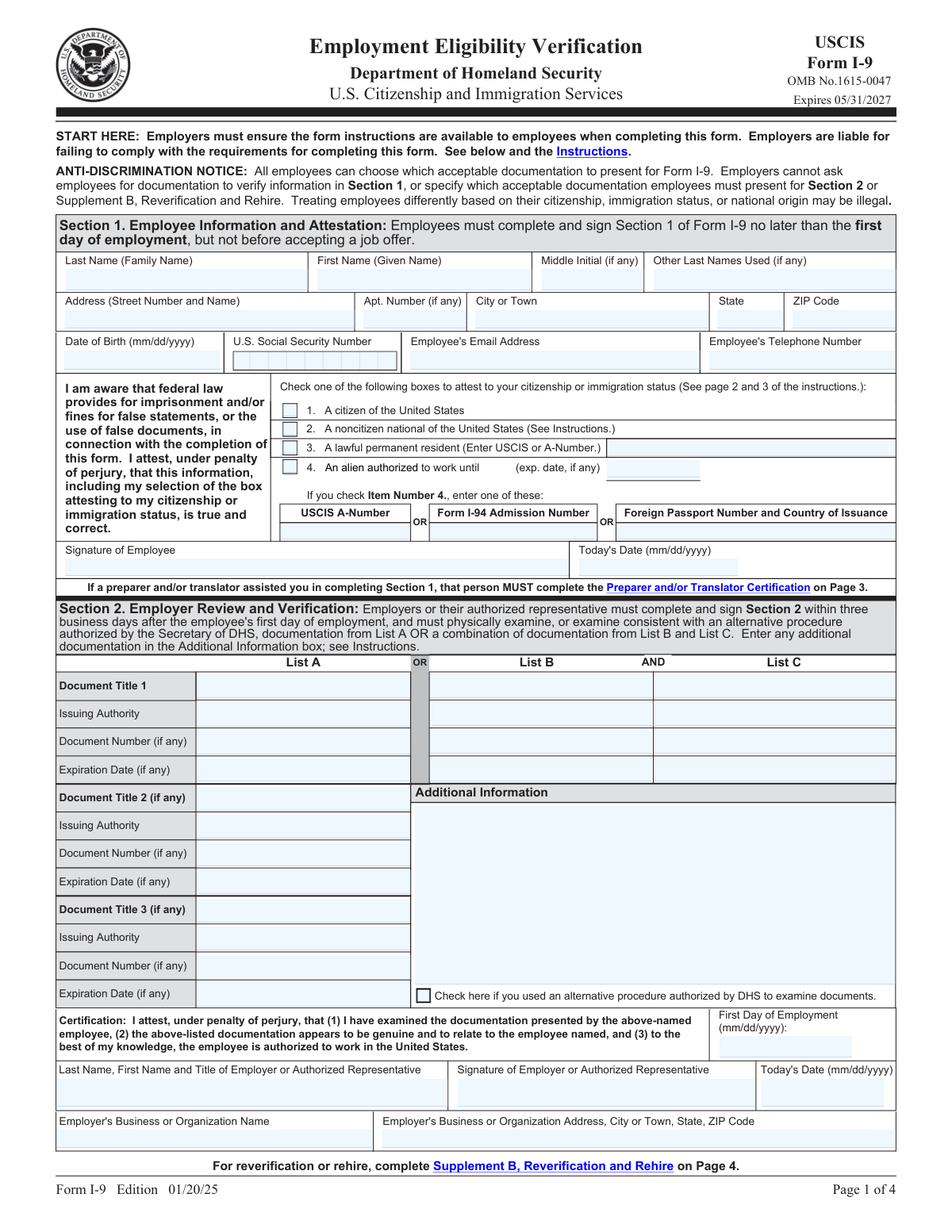
Form I-9 (Employment Eligibility Verification) is used by employers to verify the identity and work authorization of individuals hired for employment in the United States. Required for every new employee.

Form I-9 Preview
2026
Testimonials

Trusted by HR teams and employers

“Onboarding used to mean stacks of paper and manual data entry. DocuQueue lets new hires fill their I-9 online before day one. Our HR team saves hours every week.”
— Rachel Kim, HR Director at NovaTech Solutions
“We process 500+ I-9 forms a quarter through the API. The batch upload from CSV saved our compliance team from drowning in paperwork during peak hiring season.”
— David Chen, Operations Manager at StaffBridge Agency
Requirements

What you need to fill a Form I-9

These fields come from the official USCIS Form I-9 (Edition 01/20/2025). Check off each item as you gather the information.

Employee full legal name First name, middle initial, and last name as the employee is known
Address (street, apt/suite, city, state, ZIP) Employee's current residential address
Date of birth In MM/DD/YYYY format
Social Security Number (SSN) Optional unless employer participates in E-Verify
Citizenship or immigration status Check one box: U.S. citizen, noncitizen national, lawful permanent resident, or alien authorized to work
Employee signature and date Employee must sign and date under penalty of perjury. Form is invalid without a signature.
Preparer/translator name and address Required if someone other than the employee completed Section 1
Preparer/translator signature and date Must sign and date under penalty of perjury
Document examination (List A OR List B + List C) Employee presents one List A document, or one List B plus one List C document
Document details recorded Title, issuing authority, document number, and expiration date (if any)
Employer signature and date Employer or authorized representative must sign and date within 3 business days of hire
0 of 13 items ready
How It Works

Fill Form I-9 in 4 steps

Our AI completes the form accurately in under a minute. No manual data entry required.

STEP 01

Upload your data

Enter employee information manually, or upload from a spreadsheet, HRIS, or previous form.

STEP 02

AI fills the form

Our AI maps each value to the correct field, including conditional ones. Done in seconds.

STEP 03

Review & download

Check the filled form in our visual editor. Make corrections if needed, then download the PDF.

STEP 04

Send to employer for signature

Email the form to your employee for Section 1 completion, then finalize Section 2 after document review.

Why DocuQueue

Why teams choose DocuQueue for I-9 forms

Speed

Complete your I-9 in under 60 seconds. No manual data entry, no formatting headaches.

Accuracy

AI performs compliance checks to ensure your form is error-free before you download it.

Security

Your data is encrypted at rest and in transit. We never store your information after processing.

Batch Processing

Onboard 100 employees at once. Upload a CSV and generate all I-9 forms in minutes.

Use Cases

Who fills Form I-9?

HR Departments

Streamline new hire onboarding. Complete I-9s before the employee's first day and maintain a compliant I-9 file. Try our online form filler.

Small Business Owners

Stay compliant without a dedicated HR team. Fill I-9s quickly for each new hire and store them properly. Use our PDF filling API for automation.

Staffing Agencies

Process high volumes of I-9 forms for temporary and contract placements. Batch process new hire paperwork with AI form filling.

Gig Economy Platforms

Automate I-9 collection during worker onboarding. Generate I-9s programmatically via API and integrate with your existing HRIS or onboarding system.

Available via API

Automate I-9 filling

Need to process employee I-9s at scale? The DocuQueue API lets businesses fill Form I-9 programmatically. Send employee data as JSON, receive the filled PDF. Or use our AI form filler for a no-code experience.

Accuracy Checks

Validation checks

Our AI performs these checks on every I-9 form to ensure accuracy and compliance.

Section 1 Completeness

Verifies the employee has filled out name, address, SSN, citizenship status, and signed and dated the form. Flags missing or incomplete fields.

Document Verification

Confirms the documents presented appear genuine and relate to the employee. Checks that documents are on the correct list (A, B, or C).

Section 2 Completion

Ensures the employer has recorded document details correctly (title, issuing authority, number, expiration) and signed and dated Section 2.

Timeliness Check

Verifies Section 2 was completed within 3 business days of the employee's first day of work. Flags late submissions.

Retention Compliance

Confirms the form is stored properly for the required period: 3 years after hire date or 1 year after termination, whichever is later.

Common Mistakes

Errors to avoid

These are the most common mistakes when filling out Form I-9.

Employee not signing Section 1

Section 1 must be completed and signed by the employee on or before their first day of work. An unsigned form is invalid and may result in penalties.

Employer not completing Section 2

Forgetting to examine documents and record their details in Section 2 is one of the most common I-9 errors. This must be done within 3 business days of hire.

Accepting expired documents

Documents must be unexpired on the date of examination. An expired driver's license or work permit is not acceptable for I-9 purposes.

Not reverifying expired work authorization

When an employee's work authorization document expires, the employer must reverify using Supplement B before the expiration date.

Requiring specific documents

Employers cannot dictate which documents an employee presents. The employee chooses from the acceptable lists. Requiring a specific document violates anti-discrimination provisions.

Missing the 3-day deadline

Section 2 must be completed within 3 business days of the employee's first day of work. Late completion can result in fines even if the form is otherwise correct.

FAQ

Frequently asked questions

What is Form I-9?
Form I-9 (Employment Eligibility Verification) is used by employers to verify the identity and employment authorization of individuals hired for employment in the United States. Every employer must complete an I-9 for each new employee, regardless of citizenship or national origin.
Who must complete Form I-9?
All U.S. employers must complete Form I-9 for every employee hired after November 6, 1986. This applies to citizens and noncitizens alike. The employee completes Section 1, and the employer completes Section 2 after examining the employee's documents.
When must Form I-9 be completed?
Section 1 must be completed by the employee no later than the first day of employment. Section 2 must be completed by the employer within three business days of the employee's first day of work. The employer must physically examine the documents the employee presents.
What are the sections of Form I-9?
Section 1: Employee Information and Attestation, where the employee provides name, address, date of birth, SSN, and attests to their work authorization status. Section 2: Employer or Authorized Representative Review and Verification, where the employer examines documents and records their details. Supplement A: Preparer/Translator Certification, used when someone helps the employee complete Section 1. Supplement B: Reverification and Rehires, used when updating employment authorization or rehiring a former employee.
What documents are acceptable for I-9?
Acceptable documents are organized into three lists. List A documents establish both identity and employment authorization (e.g., U.S. Passport, Permanent Resident Card, Employment Authorization Document). List B documents establish identity only (e.g., Driver's License, School ID with photo). List C documents establish employment authorization only (e.g., Social Security card, Birth certificate). The employee must present either one List A document, OR one List B document plus one List C document.
Can the employer choose which documents to accept?
No. The employee chooses which documents to present from the acceptable lists. Employers cannot specify which documents an employee must provide. An employer who requires a specific document may violate the anti-discrimination provisions of the Immigration and Nationality Act.
Do I need to send Form I-9 to USCIS?
No. Employers do not send Form I-9 to USCIS or any government agency. The employer retains the form and makes it available for inspection by authorized government officers. Forms must be kept for three years after the date of hire or one year after the date of termination, whichever is later.
Can I-9 be completed remotely?
Yes, under certain conditions. Employers enrolled in E-Verify and in good standing may use a DHS-authorized alternative procedure for remote document examination. This allows the employer to examine documents via video call and retain copies. The standard in-person examination requirement applies to all other employers.
What happens if an employee's work authorization expires?
The employer must reverify the employee's employment authorization using Supplement B (Reverification and Rehires) before the current work authorization document expires. The employee must present a valid document showing continued work authorization. Employers should set up tracking systems to monitor expiration dates.
What are the penalties for I-9 violations?
Penalties vary by violation type. For paperwork violations (missing or incomplete forms), fines range from $288 to $2,861 per form for a first offense. For knowingly hiring or continuing to employ unauthorized workers, penalties are significantly higher, starting at $698 to $5,579 per worker for a first offense. Repeat offenders face higher penalties.
What is the current I-9 form version?
The current edition of Form I-9 is dated 01/20/2025 and is valid through 05/31/2027. The previous edition dated 08/01/2023 is also acceptable if it shows the 05/31/2027 expiration date. Always check the USCIS I-9 page for the latest version.
Can I fill out Form I-9 online?
Yes. You can fill out Form I-9 online with DocuQueue. Enter employee information, review the filled form, and download the completed PDF in seconds. No software installation required. You can also use our AI form filler to auto-populate fields from a photo or document scan.
Related

Similar forms

Ready to fill your first form?

Select a template, enter your information, and download the completed PDF in seconds.

Get Started Free