Invoice Template Guide →
A professional invoice with line items, tax calculation, and payment status badge. Automatically numbers each line item and supports optional notes.

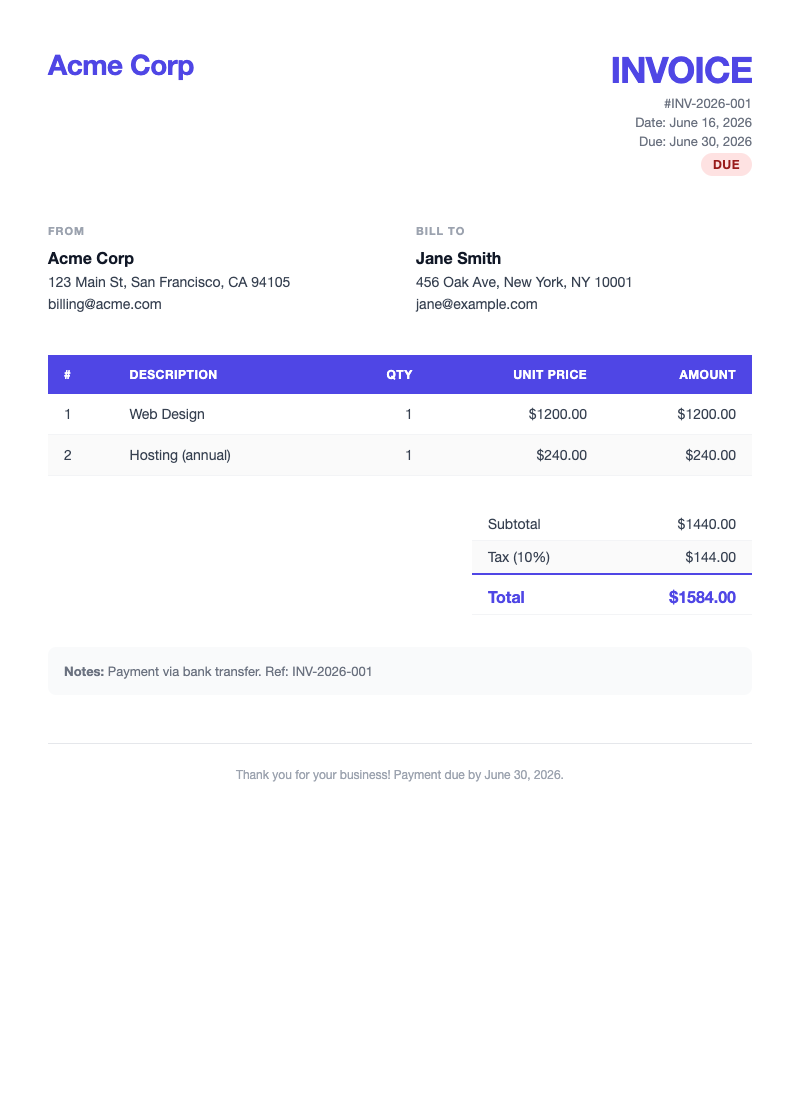
Top-level variables
company_namestringrequired
company_addressstringrequired
company_emailstringrequired
invoice_numberstringrequired
datestringrequired
due_datestringrequired
client_namestringrequired
client_addressstringrequired
client_emailstringrequired
subtotalstringrequired
tax_ratenumberrequired
tax_amountstringrequired
totalstringrequired
is_paidbooleanoptional
notesstringoptional
Loops
line_items array
descriptionstring
quantitynumber
unit_pricestring
amountstring
Tip: The template auto-numbers each line item using
loop.index. Include as many items as needed.
{
  "data": {
    "company_name":    "Acme Corp",
    "company_address": "123 Main St, San Francisco, CA 94105",
    "company_email":   "billing@acme.com",
    "invoice_number":  "INV-2026-001",
    "date":            "June 16, 2026",
    "due_date":        "June 30, 2026",
    "is_paid":         false,
    "client_name":     "Jane Smith",
    "client_address":  "456 Oak Ave, New York, NY 10001",
    "client_email":    "jane@example.com",
    "line_items": [
      {
        "description": "Web Design",
        "quantity":    1,
        "unit_price": "1200.00",
        "amount":     "1200.00"
      },
      {
        "description": "Hosting (annual)",
        "quantity":    1,
        "unit_price": "240.00",
        "amount":     "240.00"
      }
    ],
    "subtotal":   "1440.00",
    "tax_rate":   10,
    "tax_amount": "144.00",
    "total":      "1584.00",
    "notes":      "Payment via bank transfer. Ref: INV-2026-001"
  }
}
curl -X POST https://docuqueue.com/api/v1/templates/40cd6ac8-ac54-415e-9996-bca08c426444/fill \
  -H "api-key: YOUR_API_KEY" \
  -H "Content-Type: application/json" \
  -d '{
    "data": {
      "company_name":    "Acme Corp",
      "company_address": "123 Main St, San Francisco, CA",
      "company_email":   "billing@acme.com",
      "invoice_number":  "INV-2026-001",
      "date":            "June 16, 2026",
      "due_date":        "June 30, 2026",
      "is_paid":         false,
      "client_name":     "Jane Smith",
      "client_address":  "456 Oak Ave, New York, NY",
      "client_email":    "jane@example.com",
      "line_items": [
        {"description": "Web Design", "quantity": 1, "unit_price": "1200.00", "amount": "1200.00"},
        {"description": "Hosting",    "quantity": 1, "unit_price":  "240.00", "amount":  "240.00"}
      ],
      "subtotal": "1440.00", "tax_rate": 10,
      "tax_amount": "144.00", "total": "1584.00"
    }
  }'

# Response → {"job_id": "JOB_ID", "status": "queued", "credits_used": 1}

# Poll status
curl https://docuqueue.com/api/v1/status/JOB_ID \
  -H "api-key: YOUR_API_KEY"

# Download PDF once status = "completed"
curl -o invoice.pdf https://docuqueue.com/api/v1/download/JOB_ID \
  -H "api-key: YOUR_API_KEY"
Certificate Template Guide →
An elegant award or completion certificate with gold border, seal emoji, and issuer signature block. Perfect for courses, events, or achievements.

Variables
organization_namestringrequired
certificate_typestringrequirede.g. "Completion", "Achievement"
recipient_namestringrequired
achievementstringrequirede.g. "Advanced Python Course"
achievement_detailstringoptional
datestringrequired
issuer_namestringrequired
issuer_titlestringrequired
{
  "data": {
    "organization_name":  "Acme Academy",
    "certificate_type":   "Completion",
    "recipient_name":     "Jane Smith",
    "achievement":        "Advanced Python & AI Development",
    "achievement_detail": "exceptional problem-solving skills",
    "date":               "June 16, 2026",
    "issuer_name":        "Dr. Sarah Johnson",
    "issuer_title":       "Director of Education"
  }
}
curl -X POST https://docuqueue.com/api/v1/templates/b4b408f3-e347-4f1e-9c25-9800070129c4/fill \
  -H "api-key: YOUR_API_KEY" \
  -H "Content-Type: application/json" \
  -d '{
    "data": {
      "organization_name":  "Acme Academy",
      "certificate_type":   "Completion",
      "recipient_name":     "Jane Smith",
      "achievement":        "Advanced Python & AI Development",
      "achievement_detail": "exceptional problem-solving skills",
      "date":               "June 16, 2026",
      "issuer_name":        "Dr. Sarah Johnson",
      "issuer_title":       "Director of Education"
    }
  }'
Letter Template Guide →
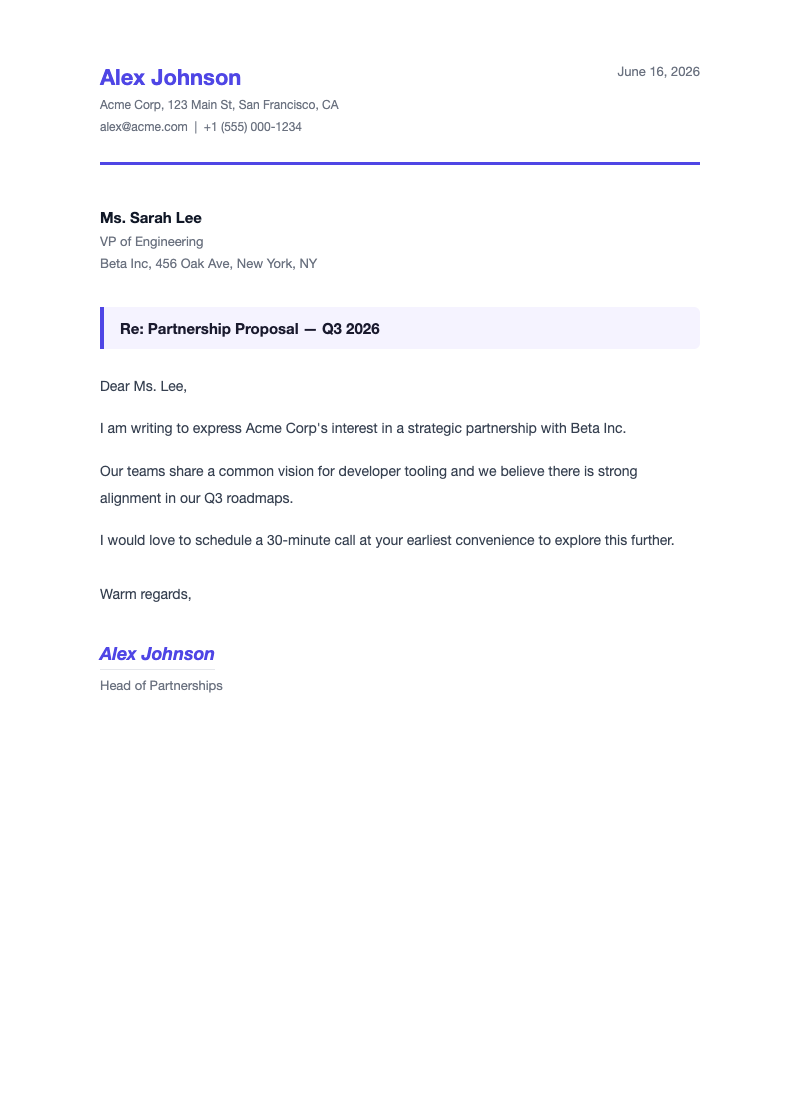
A professional business letter with branded letterhead, recipient block, multi-paragraph body, and signature. Body paragraphs are passed as an array of strings.
Sender
sender_namestringrequired
sender_addressstringrequired
sender_emailstringrequired
sender_titlestringrequired
sender_phonestringoptional
Letter
datestringrequired
subjectstringoptional
closingstringoptionaldefault: "Sincerely"
Recipient
recipient_namestringrequired
recipient_titlestringrequired
recipient_addressstringrequired
recipient_salutationstringoptionaldefault: recipient_name
Body
body_paragraphs string[ ]
Array of plain strings — each string becomes one paragraph in the letter body.
{
  "data": {
    "sender_name":           "Alex Johnson",
    "sender_title":          "Head of Partnerships",
    "sender_address":        "Acme Corp, 123 Main St, San Francisco, CA",
    "sender_email":          "alex@acme.com",
    "sender_phone":          "+1 (555) 000-1234",
    "recipient_name":        "Ms. Sarah Lee",
    "recipient_title":       "VP of Engineering",
    "recipient_address":     "Beta Inc, 456 Oak Ave, New York, NY",
    "recipient_salutation":  "Ms. Lee",
    "date":                   "June 16, 2026",
    "subject":               "Partnership Proposal — Q3 2026",
    "body_paragraphs": [
      "I am writing to express Acme Corp's interest in a strategic partnership with Beta Inc.",
      "Our teams share a common vision for developer tooling and we believe there is strong alignment in our Q3 roadmaps.",
      "I would love to schedule a 30-minute call at your earliest convenience to explore this further."
    ],
    "closing": "Warm regards"
  }
}
curl -X POST https://docuqueue.com/api/v1/templates/b97d9f2b-9027-4c4d-b909-3a7452c02ff4/fill \
  -H "api-key: YOUR_API_KEY" \
  -H "Content-Type: application/json" \
  -d '{
    "data": {
      "sender_name":    "Alex Johnson",
      "sender_title":   "Head of Partnerships",
      "sender_address": "Acme Corp, 123 Main St, SF",
      "sender_email":   "alex@acme.com",
      "recipient_name": "Ms. Sarah Lee",
      "recipient_title":"VP of Engineering",
      "recipient_address": "Beta Inc, 456 Oak Ave, NY",
      "date":    "June 16, 2026",
      "subject": "Partnership Proposal — Q3 2026",
      "body_paragraphs": [
        "I am writing to express our interest in a partnership.",
        "Our teams share a common vision for developer tooling.",
        "I would love to schedule a call at your convenience."
      ],
      "closing": "Warm regards"
    }
  }'
Report Template Guide →
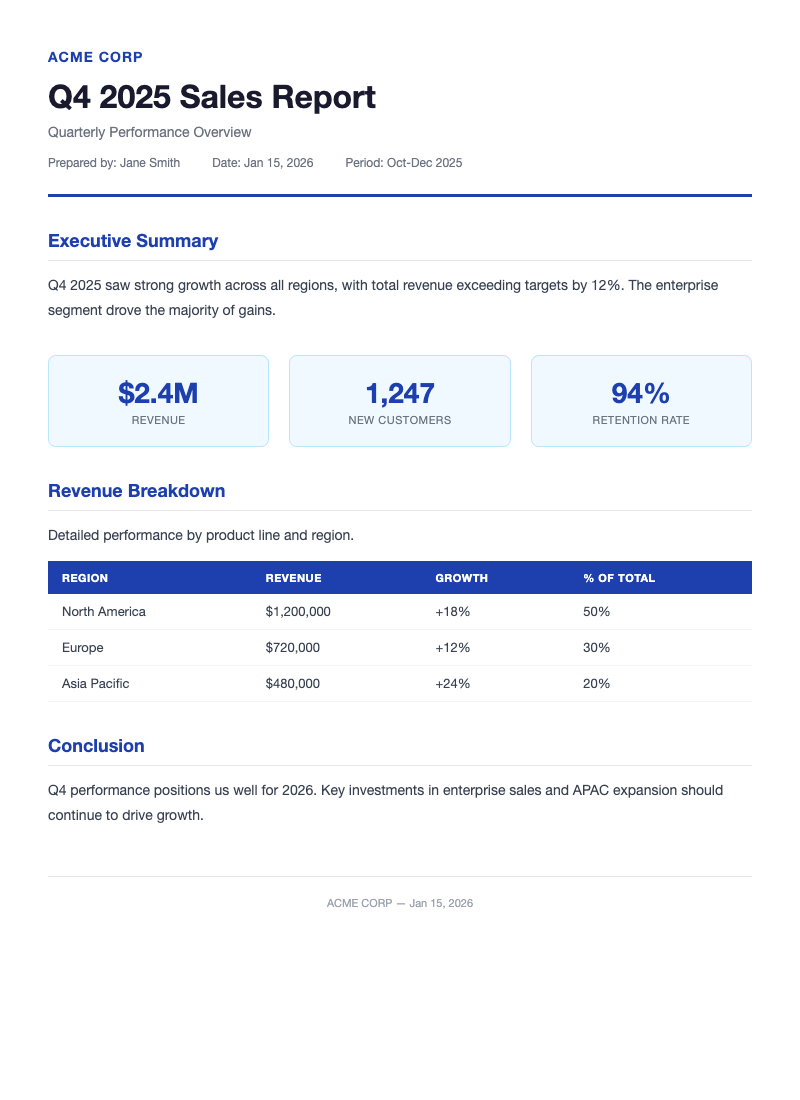
Professional business report with executive summary, metrics dashboard, data tables, and conclusion section. Perfect for annual reports, project status, and analysis documents.
Header
company_namestringrequired
report_titlestringrequired
subtitlestringoptional
authorstringrequired
datestringrequired
periodstringoptional
Content
executive_summarystringoptional
conclusionstringoptional
metrics object[ ]
valuestringrequired
labelstringrequired
sections object[ ]
titlestringrequired
contentstringrequired
{
  "data": {
    "company_name":       "Acme Corp",
    "report_title":       "Q2 2026 Financial Report",
    "subtitle":           "Quarterly Performance Overview",
    "author":             "Finance Team",
    "date":               "June 16, 2026",
    "period":             "April - June 2026",
    "executive_summary":  "Strong Q2 performance with 15% revenue growth...",
    "metrics": [
      { "value": "$2.4M", "label": "Revenue" },
      { "value": "+15%", "label": "Growth" },
      { "value": "89%", "label": "Retention" }
    ],
    "sections": [
      {
        "title": "Revenue Analysis",
        "content": "Revenue increased to $2.4M..."
      }
    ],
    "conclusion": "Q2 exceeded expectations across all metrics."
  }
}
curl -X POST https://docuqueue.com/api/v1/templates/2f2d895b-a709-4ff4-811e-71584fea78d5/fill \
  -H "api-key: YOUR_API_KEY" \
  -H "Content-Type: application/json" \
  -d '{
    "data": {
      "company_name": "Acme Corp",
      "report_title": "Q2 2026 Financial Report",
      "author": "Finance Team",
      "date": "June 16, 2026",
      "metrics": [
        {"value": "$2.4M", "label": "Revenue"},
        {"value": "+15%", "label": "Growth"}
      ],
      "sections": [
        {"title": "Revenue Analysis", "content": "Revenue increased..."}
      ]
    }
  }'
Contract Template Guide →
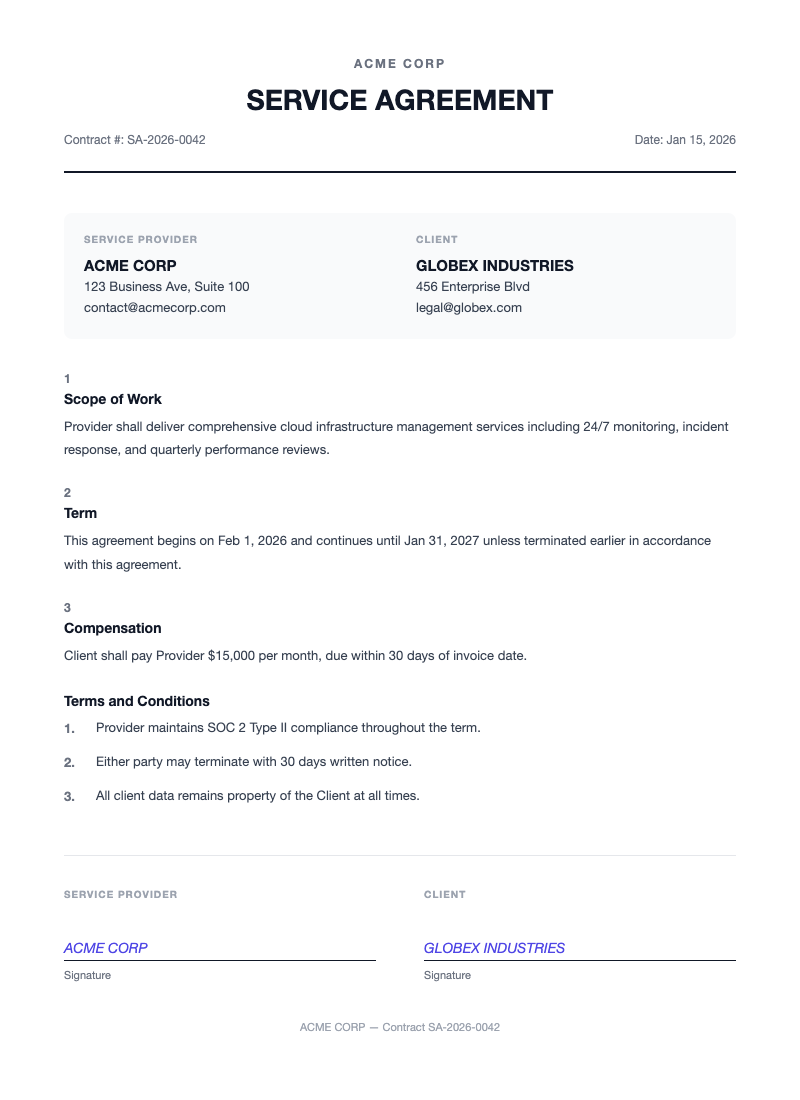
Professional service agreement with parties, scope of work, terms and conditions, and dual signature blocks. Perfect for freelancer agreements, vendor contracts, and service SOWs.
Header
company_namestringrequired
contract_numberstringrequired
datestringrequired
Provider
provider_namestringrequired
provider_addressstringrequired
provider_emailstringrequired
Client
client_namestringrequired
client_addressstringrequired
client_emailstringrequired
Terms
scope_of_workstringrequired
start_datestringrequired
end_datestringrequired
compensationstringoptional
terms string[ ]
Array of strings — each becomes a numbered term/condition.
{
  "data": {
    "company_name":     "Acme Corp",
    "contract_number":  "CTR-2026-042",
    "date":             "June 16, 2026",
    "provider_name":    "Acme Corp",
    "provider_address": "123 Main St, San Francisco, CA",
    "provider_email":   "legal@acme.com",
    "client_name":      "Beta Inc",
    "client_address":   "456 Oak Ave, New York, NY",
    "client_email":     "contracts@beta.com",
    "scope_of_work":    "Web application development and API integration...",
    "start_date":       "July 1, 2026",
    "end_date":         "December 31, 2026",
    "compensation":     "$50,000 payable in monthly installments",
    "terms": [
      "All work product remains property of Client until full payment.",
      "Either party may terminate with 30 days written notice.",
      "Confidentiality obligations survive termination by 2 years."
    ]
  }
}
curl -X POST https://docuqueue.com/api/v1/templates/3f5dad05-7e11-48c0-b6cf-6beaefa2dc43/fill \
  -H "api-key: YOUR_API_KEY" \
  -H "Content-Type: application/json" \
  -d '{
    "data": {
      "company_name": "Acme Corp",
      "contract_number": "CTR-2026-042",
      "date": "June 16, 2026",
      "provider_name": "Acme Corp",
      "provider_address": "123 Main St, SF",
      "client_name": "Beta Inc",
      "client_address": "456 Oak Ave, NY",
      "scope_of_work": "Web application development...",
      "start_date": "July 1, 2026",
      "end_date": "December 31, 2026",
      "terms": [
        "All work product remains property of Client.",
        "Either party may terminate with 30 days notice."
      ]
    }
  }'
Shipping Label Template Guide →
Compact shipping label with sender/recipient addresses, tracking barcode, package details, and handling instructions. A6 format for direct printing on label stock.
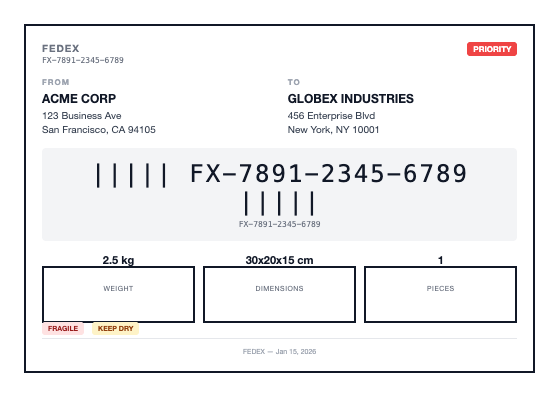
Shipping Info
carrierstringrequirede.g. "FedEx", "UPS"
tracking_numberstringrequired
prioritystringoptionale.g. "Express", "Priority"
shipping_datestringrequired
Sender
sender_namestringrequired
sender_addressstringrequired
sender_citystringrequired
sender_statestringrequired
sender_zipstringrequired
Recipient
recipient_namestringrequired
recipient_addressstringrequired
recipient_citystringrequired
recipient_statestringrequired
recipient_zipstringrequired
Package
weightstringrequirede.g. "2.5 kg"
dimensionsstringrequirede.g. "30x20x10 cm"
piecesstringrequired
handling_instructions string[ ]
Array of strings — e.g. "Fragile", "This Side Up", "Keep Dry".
{
  "data": {
    "carrier":         "FedEx",
    "tracking_number": "794644790132",
    "priority":        "Express",
    "shipping_date":   "June 16, 2026",
    "sender_name":     "Acme Corp",
    "sender_address":  "123 Main St",
    "sender_city":     "San Francisco",
    "sender_state":    "CA",
    "sender_zip":      "94102",
    "recipient_name":  "Jane Smith",
    "recipient_address": "456 Oak Ave",
    "recipient_city":  "New York",
    "recipient_state": "NY",
    "recipient_zip":   "10001",
    "weight":          "2.5 kg",
    "dimensions":      "30x20x10 cm",
    "pieces":          "1",
    "handling_instructions": [
      "Fragile",
      "This Side Up"
    ]
  }
}
curl -X POST https://docuqueue.com/api/v1/templates/4cf3c572-58bc-41b1-80b3-8afca937dbca/fill \
  -H "api-key: YOUR_API_KEY" \
  -H "Content-Type: application/json" \
  -d '{
    "data": {
      "carrier": "FedEx",
      "tracking_number": "794644790132",
      "priority": "Express",
      "shipping_date": "June 16, 2026",
      "sender_name": "Acme Corp",
      "sender_address": "123 Main St",
      "sender_city": "San Francisco",
      "sender_state": "CA",
      "sender_zip": "94102",
      "recipient_name": "Jane Smith",
      "recipient_address": "456 Oak Ave",
      "recipient_city": "New York",
      "recipient_state": "NY",
      "recipient_zip": "10001",
      "weight": "2.5 kg",
      "dimensions": "30x20x10 cm",
      "pieces": "1",
      "handling_instructions": ["Fragile", "This Side Up"]
    }
  }'